Construction data security: How to protect your data across offices and job sites

On any given morning, a construction business might have estimators in the office, a site manager checking revised drawings on a tablet and a foreman approving a delivery from a ute. Each of them needs plans, emails and project files, and each connection is a door that has to stay locked.
That’s the challenge of construction data security. With teams spread out and files shared with dozens of subcontractors, protecting “the office network” no longer covers it. This article explains where construction data is most exposed, what an incident can cost and how to keep information safe without slowing anyone down.
Key takeaways
- Construction data security is about protecting plans, contracts, emails and financial records wherever they’re accessed, not just inside the office.
- Email compromise and invoice fraud are among the most commonly reported cybercrimes against businesses, and construction’s frequent progress payments make it an attractive target.
- Secure cloud access for construction teams, with multi-factor authentication and role-based permissions, keeps files available on site without leaving them open to anyone.
- Mobile device security matters because phones and tablets on site are easily lost, stolen or connected to unsafe networks.
- A data backup for construction business records should be automatic, stored separately and tested, so a ransomware attack or failed device doesn’t stop a project.
Why construction data security has become urgent
Construction businesses hold more sensitive information than many realise. Tender pricing, drawings, contracts, employee records and supplier bank details sit across inboxes, laptops and cloud folders.
Attackers know it, and data breaches keep climbing. The national privacy regulator received 1,205 data breach notifications in 2025, an all-time high and 8% more than the year before. The cost is real too: the Annual Cyber Threat Report 2024–25 put the average self-reported cost of cybercrime at $56,600 per report for small businesses and $97,200 for medium businesses.
Several of the threats businesses need to prepare for hit construction especially hard, because the industry runs on email, mobile devices and shared files.
Where construction data is most at risk
Construction data rarely stays in one place, and every move between people, devices and locations creates gaps.
Email and payment fraud
Construction runs on invoices, variations and progress claims, which makes it ideal territory for business email compromise (BEC). In a BEC scam, a criminal gains access to a mailbox or imitates a supplier, then asks for payment to a “new” bank account. The same threat report found BEC fraud with financial loss made up 15% of cybercrime reports from businesses, second only to email compromise without financial loss at 19%. Government advice on protecting against business email compromise recommends multi-factor authentication and verifying any payment change by phone using a number you already hold.
Phones and tablets on site
Site teams use phones and tablets to view drawings, take photos and sign off work, and those devices get left in vehicles or connected to whatever Wi-Fi is nearby. Without mobile device security, one lost tablet can expose your email, file storage and client details, which is why mobile protection is so necessary for field teams. Guidance on travelling with mobile devices also warns against public Wi-Fi and suggests using mobile data or a hotspot instead.
File sharing with subcontractors and clients
Architects, subcontractors and clients all need project documents, and the quickest option is often a personal file-sharing link. Over time, nobody knows who still has access. Secure file sharing for project teams means using one approved platform, giving each person only the folders they need and removing access when a job finishes.
Human error
Not every breach involves a hacker. The privacy regulator’s January–June 2025 statistics show human error caused 37% of notified breaches, up from 29% in the previous six months. Sending a file to the wrong person or clicking a fake delivery text can be enough.
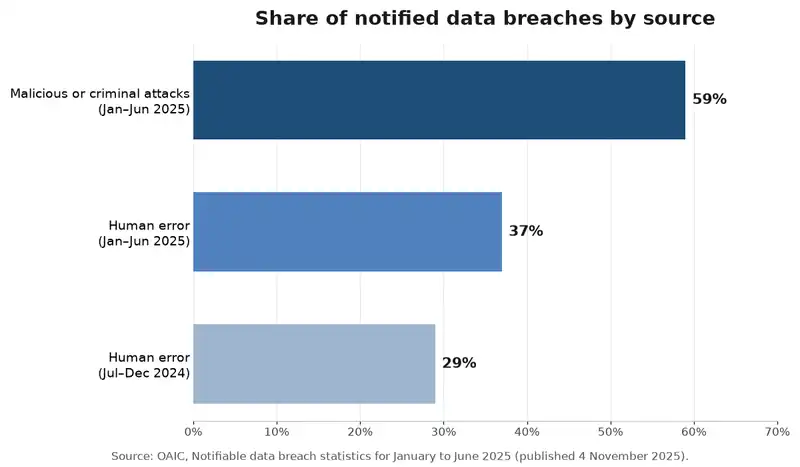
Source: OAIC notifiable data breach statistics, January to June 2025
What a data incident can cost a construction business
A cyber incident hits more than the IT budget. A redirected progress payment can wipe out a job’s margin, and ransomware that locks drawings and schedules can stall several sites at once, leaving crews idle and penalties looming.
Reputation suffers too. Builders win work on trust, and head contractors increasingly ask how their information will be protected, so firms that practise strong cyber security for construction companies have an edge when tendering.
Practical steps to protect data without slowing teams down
Good security should feel invisible to the people doing the work. These steps cover the biggest risks for most small and medium firms.
- Move to secure cloud access. Store project files in a managed cloud platform rather than on individual laptops. Remember the cloud shared responsibility model: the provider secures the platform, but you’re responsible for accounts, permissions and settings.
- Turn on multi-factor authentication everywhere. Apply it to email, cloud storage and accounting systems, following advice on securing accounts and identities.
- Manage every device. Use screen locks, encryption, automatic updates and remote wipe on all phones, tablets and laptops. Endpoint protection essentials apply as much to a site tablet as to an office PC.
- Control who sees what. Set permissions by role and project, and review them when people leave or jobs close.
- Lock down payments. Require phone verification and a second approver for any change to bank details, as Scamwatch recommends for BEC scams.
- Back up automatically and test restores. Follow the 3-2-1 backup rule, keep one copy separate from your main systems and test recovery regularly.
- Train your team. Short, regular reminders about phishing, payment requests and public Wi-Fi help office and site staff spot scams early.
| Where data is used | Common risk | Key protection |
| Head office | Phishing emails and unpatched computers | Email filtering, automatic updates, staff training |
| Job sites | Lost devices and unsafe Wi-Fi | Device encryption, remote wipe, mobile data or VPN |
| Mobile and remote work | Stolen passwords and personal apps | Multi-factor authentication and managed devices |
| Shared project files | Uncontrolled links and old access | One approved platform with role-based permissions |
| Payments and invoices | Business email compromise | Phone verification and dual approval |
| Backups | Ransomware encrypting backups too | Separate, automated and tested backups |
The government’s cyber security checklist is a handy way to check progress against these basics.
Why a proactive approach beats cleaning up afterwards
Most incidents exploit gaps that could have been closed earlier, such as an account without multi-factor authentication. Fixing them first costs far less than recovering, and untested backups often fail exactly when they’re needed.
Threats keep evolving, with AI-assisted phishing among the cyber security trends shaping 2026, so security works best as an ongoing habit. Businesses that build data security in from the start of every new system avoid expensive retrofits later.
How ICTechnology keeps construction data safe from office to site
ICTechnology helps construction businesses implement secure cloud access, device protection, backups and practical cybersecurity measures for mobile teams. It already supports builders and contractors, providing IT support and website maintenance for formwork and structural contractors Future Form and Fastform.
Its cyber security services include cyber risk assessments, managed security and penetration testing, while email and spam protection helps stop phishing and malware before it reaches inboxes. For files and collaboration, the team offers Microsoft 365 setup and support and private cloud solutions built around governance and security.
Data is protected through a data backup service covering online, local and external backups, plus offsite cloud backup with file versioning. Client portals can stay patched and backed up through ICDigital’s website and app maintenance.
Backed by more than 20 years of supporting business IT and networks, a team of engineers and security specialists delivers proactive support both onsite and remotely, which suits teams spread across several sites.
Frequently asked questions
What is construction data security?
Construction data security is the protection of a building business’s plans, contracts, emails, financial records and personal information from loss, theft and unauthorised access. It covers offices, job sites, mobile devices and cloud platforms.
Why is cyber security important for construction companies?
It matters because construction firms handle large payments, tender information and personal data across many locations. Invoice fraud, ransomware and lost devices can cause financial loss and project delays.
How can construction teams share files securely?
Use one approved cloud platform with multi-factor authentication and role-based permissions, avoid personal sharing links and remove access when subcontractors finish.
How often should a construction business back up its data?
Back up automatically at least daily, keep one copy separate from your main systems and test restores regularly.
What should small construction businesses do first?
Start with multi-factor authentication, automatic updates and automatic backups, then add device management and phone verification for payment changes.
Does ICTechnology work with construction businesses?
Yes. ICTechnology provides IT support and website maintenance for construction businesses such as Future Form and Fastform, and offers cyber security, Microsoft 365 support, cloud and data backup services.
Keeping every project protected, wherever the work happens
Protecting your data doesn’t have to slow your crews. With secure cloud access, protected devices, clear sharing rules and reliable backups, your team can work from any site while plans, payments and client information stay safe.
Start with one quick win this week: turn on multi-factor authentication for every email account. It’s simple, and it closes one of the most common doors attackers use.
Interested in a quote and consultation? Reach out to: [email protected]
Need help with your existing IT systems? Please reach out! [email protected]
Any other enquiries? Fill out our contact form here.