Digital tools that streamline construction operations: web and app development
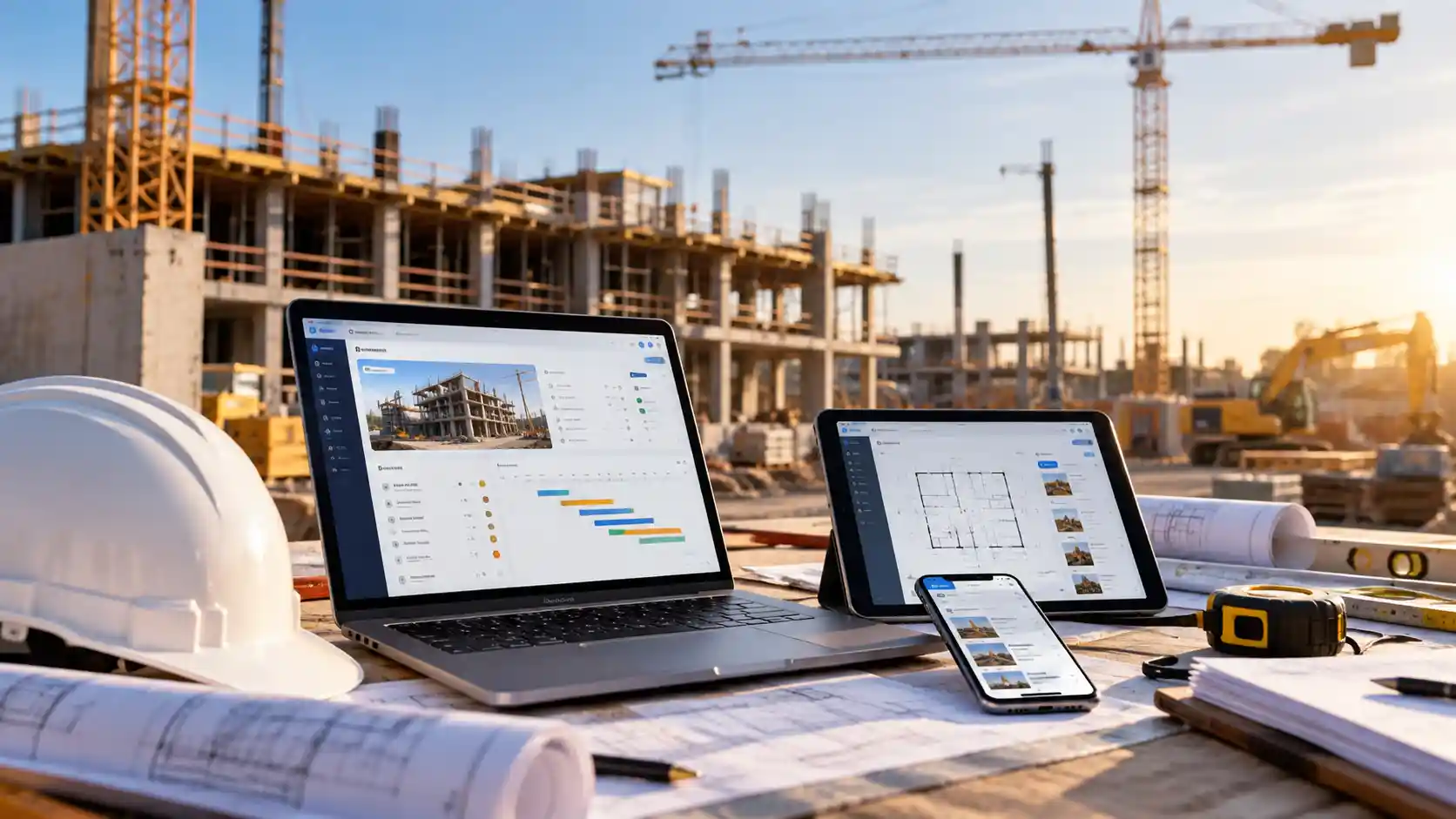
It’s 6.30am and the site supervisor is already juggling three problems. The concrete pour has moved, the electrician has last week’s drawings and yesterday’s site diary is still in a notebook on the dashboard. Back at the office, the project manager is chasing the same information through texts and missed calls.
When information lives in paper forms, spreadsheets and personal inboxes, small delays quickly become rework, disputes and lost margin. This article looks at how custom web and app development can streamline construction workflows, where manual processes cost the most and what to consider before investing.
Key takeaways
- Digital tools for construction replace paper forms, scattered spreadsheets and text-message chains with one reliable source of project information.
- A field reporting app lets crews log progress, photos, defects and safety checks on site, so the office sees issues the same day.
- Construction workflow automation removes repetitive admin such as re-keying timesheets, chasing approvals and sending reminders.
- Off-the-shelf construction management software suits many businesses, while custom app development for construction fills gaps where standard tools don’t match how a team actually works.
- The best results come from mapping your workflows first, starting small and securing the data your new tools hold.
Why construction operations are so hard to coordinate
Every project brings together clients, designers, subcontractors, suppliers and inspectors, often across several sites. Each needs the right information at the right time, and most of it changes daily.
The industry’s productivity record shows how costly that complexity has become. In its February 2025 report, *Housing construction productivity: Can we fix it?*, the Productivity Commission found that builders now complete about half as many homes per hour worked as they did in 1995. Even after adjusting for bigger, better-quality homes, labour productivity in housing construction is 12% lower, while productivity across the broader economy rose 49%.
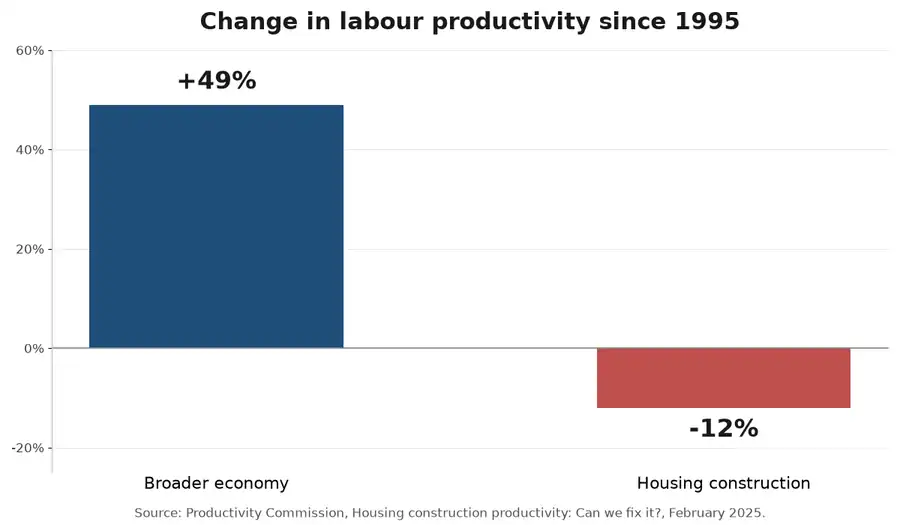
Source: Productivity Commission, Housing construction productivity: Can we fix it?, February 2025
The Commission points to slow approvals, regulation and low innovation. Business size plays a part too. Master Builders reports that more than 98.6% of construction businesses employ fewer than 20 people, so there’s rarely a dedicated person whose job is to fix clunky processes. Smaller firms can still punch above their weight, and plenty of small businesses are already using big-business technology to close that gap.
Where manual processes cost construction businesses the most
Manual work hides in everyday tasks. These are the areas where it usually does the most damage.
Scheduling and resourcing
When the programme lives in one person’s spreadsheet, every change is passed on by phone. Trades arrive on the wrong day and nobody is sure which schedule is current.
Communication and document access
Drawings, RFIs and variations travel by email, text and printed copies. A crew working from an outdated revision can mean costly demolition and rework.
Field reporting and safety records
Paper site diaries, prestart checklists and incident forms are slow, easy to lose and leave the office blind until someone types them up. Accurate safety records matter: the national work health and safety regulator’s 2026 statistics show construction recorded 41 worker fatalities in 2025, almost one in five nationally.
How web and app development streamlines construction workflows
The right digital tools give everyone, from the director to the apprentice, one place to find and record information. Here’s how common tasks change.
| Task | Manual process | With digital tools |
| Site diaries and progress | Handwritten notes typed up days later | A field reporting app captures notes, photos and GPS-tagged updates on site |
| Safety checks and incidents | Paper prestart forms filed in the site office | Mobile checklists with instant alerts to supervisors |
| Drawings and documents | Printed sets and emailed revisions | A secure web portal that always shows the latest version |
| Timesheets and approvals | Paper timesheets re-keyed into payroll | Construction workflow automation routes approvals and syncs data |
| Client updates | Ad hoc phone calls and emails | A client portal with progress photos and milestones |
Off-the-shelf software or a custom-built tool?
Many businesses start with established construction management software for scheduling, estimating or document control, and that’s often the right call. Problems appear when a team pays for five subscriptions that don’t talk to each other, or bends its processes around software built for someone else.
That’s where custom app development for construction comes in. A custom web portal or mobile app can connect existing systems, match your exact forms and approvals, and work offline on sites with patchy coverage. There are good reasons mobile apps have become essential for business growth across many industries.
What better visibility means for your business
When information flows freely, the benefits show up across the whole operation:
- Fewer costly mistakes. Crews build from current drawings, and defects are caught and photographed before they’re covered up.
- Faster decisions. Managers see live progress, so they can resolve issues the same day instead of waiting for the weekly meeting.
- Stronger records. Time-stamped photos and digital sign-offs support variation claims and help resolve disputes.
- Less admin. Supervisors spend more time leading crews and less on paperwork at night.
Practical steps before you invest in new tools
A successful project starts with how your team works, not with the technology. Before you commit:
- Map your workflows. Note how information moves from quote to handover, and where it gets stuck or re-keyed.
- Talk to your crews. They know which forms they hate and which steps they skip, and their buy-in decides whether a tool gets used.
- Start with one problem. Turning a single pain point into a focused first version of an app lowers risk and shows value quickly.
- Design for the site. Large buttons, offline mode and simple screens matter when someone is wearing gloves in bright sunlight. Even small details, like the size and placement of buttons, shape how easy an app is to use.
- Plan integrations early. Check how the tool will share data with accounting, payroll and scheduling systems.
- Build security in. Turn on multi-factor authentication, control who can see what and follow the government’s advice on securing accounts and identities. If you collect personal details from workers or clients, review your privacy obligations.
Government guidance on choosing digital tools for business makes a handy checklist, while the web development tools worth knowing about shape how quickly a public-facing site can be built and updated.
Why acting now pays off
Clients increasingly expect online updates, and head contractors look for subcontractors who report quickly and accurately. Businesses still running on paper risk falling behind on tenders, margins and staff retention, especially as younger workers expect to use their phones on the job.
Starting early also lets you improve gradually. A small app that solves one problem this year can grow into a connected system. Websites follow the same principle, and it’s far cheaper to build search visibility into a site from day one than to retrofit it later.
How ICTechnology helps construction teams build smarter digital tools
ICTechnology helps construction businesses develop practical digital solutions, including websites, apps and operational tools that improve efficiency, simplify workflows and support better project coordination. The team already provides IT support and website maintenance for formwork and structural contractors Future Form and Fastform, so it understands the pressures builders face on and off site.
Its application and database development work covers data-driven internet and intranet applications, custom dashboards, business process solutions and workflow automation that integrates your IT systems, with results available from any web-enabled device. On the web side, web development services span responsive, mobile, dynamic and custom websites, guided by an approach to web design and development that puts responsive design and SEO at the core.
Once your tools are live, cyber security services help protect project data, and Microsoft 365 support keeps shared files and team communication running smoothly. ICTechnology started as a one-person operation and grew into a specialised IT business, and you can meet the specialists behind each project or see why businesses trust its proactive approach.
Frequently asked questions
What are digital tools for construction?
Digital tools for construction are software, web portals and mobile apps that manage tasks such as scheduling, document control, field reporting and safety checks. They replace paper forms and scattered spreadsheets with shared, up-to-date information.
What is a field reporting app?
A field reporting app lets site teams record progress, photos, defects and safety checks on a phone or tablet. Reports reach the office instantly, and good apps work offline when coverage drops.
Should I choose construction management software or a custom app?
Choose off-the-shelf construction management software if it fits your processes with little change. Consider a custom app when you need to connect several systems, match unique workflows.
How does construction workflow automation save time?
Construction workflow automation handles repetitive steps such as routing approvals, sending reminders and syncing timesheets with payroll. This cuts manual data entry and errors.
How can construction businesses keep their apps and data secure?
Use multi-factor authentication, give each user only the access they need, keep software updated and back up project data. Choose a developer who builds security in from the start.
Does ICTechnology build custom apps for construction businesses?
Yes. ICTechnology offers custom software development in Australia, including custom applications, databases, dashboards and workflow automation, as well as responsive websites. It also provides IT support and website maintenance for construction businesses such as Future Form and Fastform.
Building a better-connected construction business
Construction will always involve moving parts, but your information doesn’t have to be scattered. The right web and app tools put schedules, drawings and site reports in one place, so your team spends less time chasing paperwork and more time building.
Start by picking the one process that frustrates your crews the most. Fix that well, and you’ll have a solid foundation for every digital tool that follows.
Interested in a quote and consultation? Reach out to: [email protected]
Need help with your existing IT systems? Please reach out! [email protected]
Any other enquiries? Fill out our contact form here.